> For the complete documentation index, see [llms.txt](https://help.sleuth.io/llms.txt). Markdown versions of documentation pages are available by appending `.md` to page URLs; this page is available as [Markdown](https://help.sleuth.io/sleuth-skills/sleuth-skills.md).
# Welcome to Sleuth Skills
Sleuth Skills is where your team creates, reviews, and governs the AI assets — skills, rules, agents, commands, hooks, MCP servers, and Claude Code plugins — that make every engineer more productive.
Your best engineers have figured out how to make AI assistants incredibly productive — custom skills, agents, MCP configs, coding rules. But that knowledge usually lives on one laptop. Sleuth Skills ([skills.new](https://skills.new)) turns those private discoveries into team assets that everyone inherits automatically.
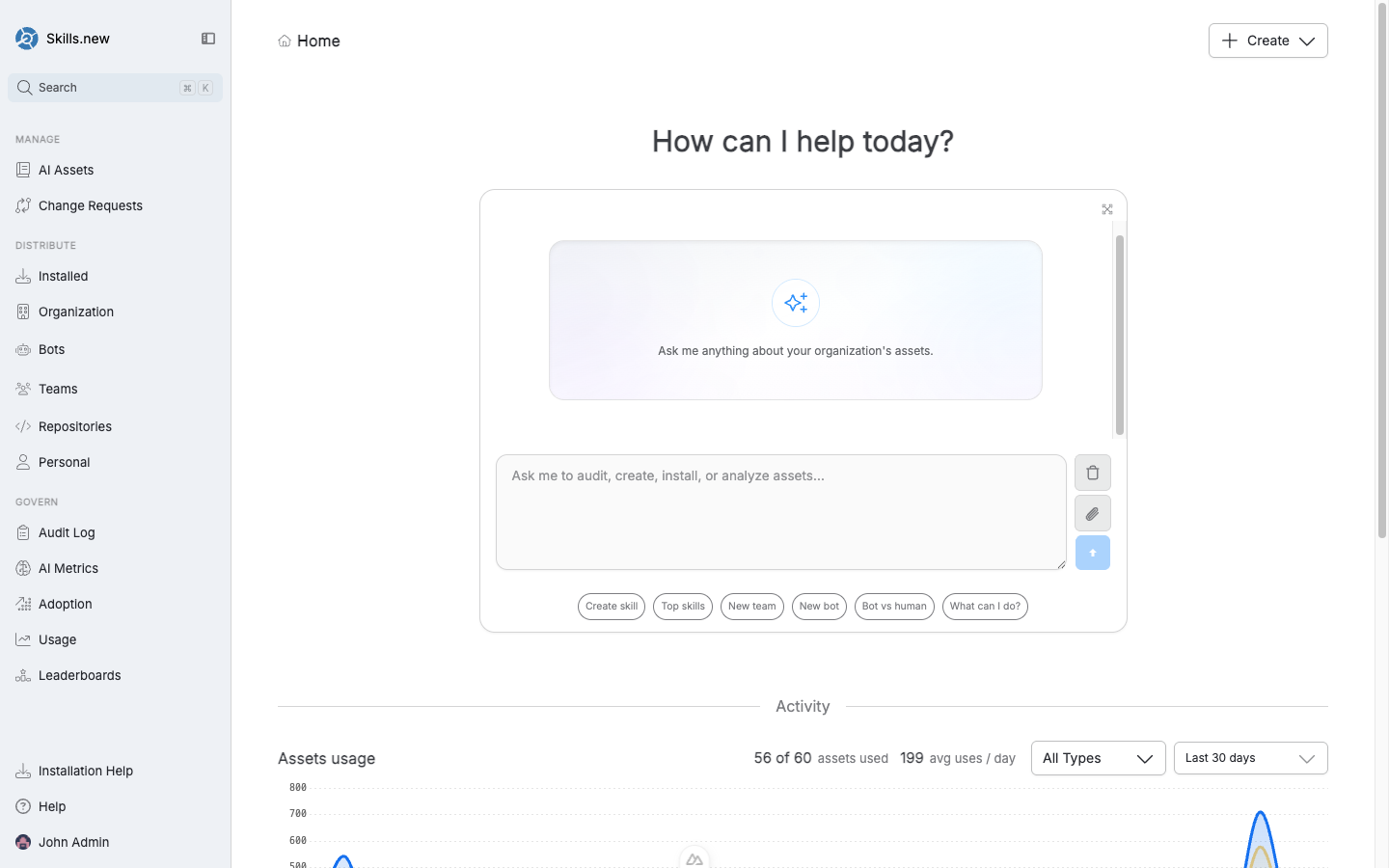
The Skills.new home screen, organized around Manage, Distribute, and Govern
Sleuth Skills is the **application your team works in every day** — a web app at [skills.new](https://skills.new) where you author assets, review your teammates' edits, target who receives what, and see what's actually being used. It's where the whole asset lifecycle lives: from "someone wrote a useful skill" to "the right engineers are using it and we can prove it."
## How Sleuth Skills is organized
Everything in the product falls into one of three workflows, and the left-hand navigation reflects that split:
| Workflow | What you do here | Where it lives |
| -------------- | ------------------------------------------------------------------------------------------------------------------------------------------------------------------- | ------------------------------------------------------------------------ |
| **Manage** | Create, edit, version, and review AI Assets (skills, rules, agents, commands, hooks, MCP servers, Claude Code plugins). Configure RBAC and approve Change Requests. | `AI Assets`, `Change Requests` |
| **Distribute** | Choose *who* gets each asset: your whole organization, specific repositories, teams, bots, or an individual person. | `Installed`, `Organization`, `Bots`, `Teams`, `Repositories`, `Personal` |
| **Govern** | See what is being adopted, by whom, and on which repositories — plus an append-only audit trail of every install and team change. | `Audit Log`, `AI Metrics`, `Adoption`, `Usage`, `Leaderboards` |
For the **Distribute** side, Sleuth Skills uses the [`sx`](https://github.com/sleuth-io/sx) CLI as its delivery runtime. When an engineer runs `sx install` in a project, `sx` talks to Skills.new, resolves what should be installed for that user and that repository, and writes the right files into `.claude/`, `.cursor/`, or the relevant client directory.
## Where to go next
* **New here?** Start with the [Quick Start Guide](/sleuth-skills/quick-start.md) — create an asset, install it, verify it's running.
* **Creating or editing assets?** See [Manage](/sleuth-skills/manage.md) for RBAC, asset lifecycle, and each asset type.
* **Setting up distribution?** Read [Distribute](/sleuth-skills/distribute.md) to pick the right installation target for each asset.
* **Tracking adoption?** Jump to [Govern](/sleuth-skills/govern.md) for the audit log and usage dashboards.
## Supported AI clients
Sleuth Skills is client-agnostic and works in two modes:
* **CLI-installed clients** use [`sx install`](https://github.com/sleuth-io/sx) to write assets into the client's configuration directory on the developer's machine. This covers every local or IDE-based client.
* **Web clients** (claude.ai and chatgpt.com) can't be written to from the CLI. Instead, Sleuth Skills exposes your org's assets to them through a hosted **MCP shim** — configure the shim once in the web client's MCP settings and your assets are available in every conversation.
| Client | Delivery | Asset types supported |
| ---------------------- | -------- | --------------------------------------------------------- |
| Claude Code | `sx` | All |
| claude.ai | MCP shim | Skills, agents, commands, MCP tool calls |
| chatgpt.com | MCP shim | Skills, agents, commands, MCP tool calls |
| Cursor | `sx` | Skills, rules, commands, MCP servers, hooks |
| GitHub Copilot | `sx` | Skills, rules, commands, agents, MCP servers, local hooks |
| Gemini (CLI / VS Code) | `sx` | Skills, rules, commands, MCP servers, hooks |
| Gemini (JetBrains) | `sx` | Rules, MCP servers |
| Codex | `sx` | Skills, commands, MCP servers |
| Cline | `sx` | Skills, rules, workflows, MCP servers, hooks |
| Kiro | `sx` | Skills, rules, commands, MCP servers |
---
# Agent Instructions
This documentation is published with GitBook. GitBook is the documentation platform designed so that both humans and AI agents can read, navigate, and reason over technical content effectively. Learn more at gitbook.com.
## Querying This Documentation
If you need additional information that is not directly available in this page, you can query the documentation by asking a question.
Perform an HTTP GET request on the following URL with the `ask` and `goal` query parameters:
```
GET https://help.sleuth.io/sleuth-skills/sleuth-skills.md?ask=&goal=
```
`ask` is the immediate question: it should be specific, self-contained, and written in natural language.
`goal` is what the user is ultimately trying to achieve, the reason they need the answer. Sharing it helps GitBook give you a better, more relevant answer. A goal is most helpful when it describes the outcome the user wants rather than restating the question. For example, with `ask=how do I create an API token`, a goal like `automate deployments from our CI pipeline` lets GitBook tailor the answer to that use case.
The response will contain a direct answer to the question and relevant excerpts and sources from the documentation.
Use this mechanism when the answer is not explicitly present in the current page, you need clarification or additional context, or you want to retrieve related documentation sections.