> For the complete documentation index, see [llms.txt](https://help.sleuth.io/llms.txt). Markdown versions of documentation pages are available by appending `.md` to page URLs; this page is available as [Markdown](https://help.sleuth.io/sleuth-skills/distribute/teams.md).
# Teams
Teams group members, bots, and repositories into a single unit. Installing an asset to a team cascades to every member, every bot, and every repository on the team.
A **team** in Sleuth Skills is a named group that contains three things:
* **Members** — users in your organization.
* **Bots** — service accounts that can be assigned the same assets as human members.
* **Repositories** — git repositories whose assets are flattened out to each member when `sx install` runs.
Teams are how you route assets to a role or a group without hand-managing every individual user.
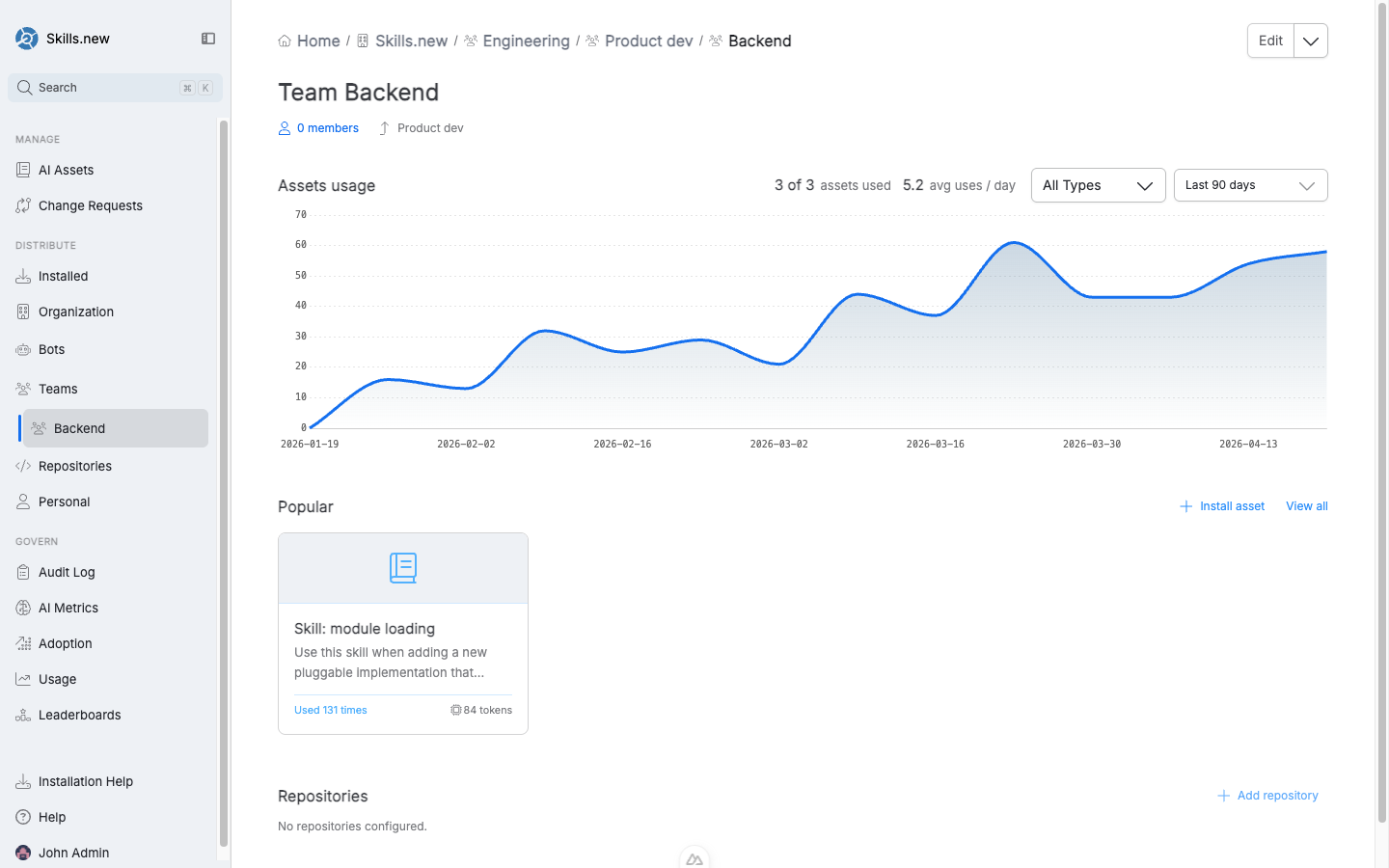
The Team detail view — usage chart, popular assets, members, and configured repositories. Teams can nest.
## Creating a team
Open the **Teams** entry in the left nav and click **Create new team**, or use the home-page assistant ("new team"). You'll be prompted for:
* **Name** (required).
* **Description** — a short sentence so teammates know what the team is for.
* **Members** — the users who belong. At least one admin is required at all times; if you're creating the team, you'll be added as a member and admin automatically.
* **Repositories** — the codebases this team owns.
## Team admins
Every team has one or more **admins**. Admins can add and remove members, change repositories, install assets to the team, and delete the team itself. Regular members can view the team but not modify it.
A mutation that would leave the team with zero admins is rejected; you must promote another admin before removing or demoting the last one.
## Installing to a team
From any asset's detail page, click **Install asset** and pick a team. Alternatively, from the team's page, use **Install asset** in the Popular section.
When `sx install` runs, a team-scoped asset is resolved against the caller's identity:
* If the user is a **member** of the team, the asset is expanded to installs for each of the team's **repositories**. The user gets the asset in any of those repos' `.claude/` directories.
* If the user is **not a member**, the team install is ignored.
This means team installs are repository-aware: a Backend team with three repos will install the team's `api-patterns` skill into each of those three repos for each member, without touching anyone else's projects.
## Adding a bot to a team
Bots can join teams the same way users do. When a bot is a member, any team-scoped install also resolves for that bot. This is how agent loops pick up the same curated asset set humans use without a separate installation flow.
See [Bots](/sleuth-skills/distribute/bots.md) for the full bot lifecycle.
## Nested teams
Teams can nest inside other teams. The breadcrumb on a team page shows the full chain — e.g. `Skills.new / Engineering / Product dev / Backend`. Nested teams inherit parent membership for asset resolution, which makes it natural to model your org chart without duplicating installs.
## Deleting a team
Deleting a team cascades: every team-scoped install that references it is automatically cleared, and an `install.cleared` audit event is emitted for each affected asset with `reason = "team_deleted"` so auditors can reconstruct why an asset stopped installing.
## Identity and admin gating
Team membership, admin checks, and asset installs all key off the email from your authenticated session. On the CLI side, `sx` uses `git config user.email` and enforces admin checks inside the vault mutation transaction — not just client-side — so a concurrent demotion cannot race past the pre-check.
---
# Agent Instructions
This documentation is published with GitBook. GitBook is the documentation platform designed so that both humans and AI agents can read, navigate, and reason over technical content effectively. Learn more at gitbook.com.
## Querying This Documentation
If you need additional information that is not directly available in this page, you can query the documentation by asking a question.
Perform an HTTP GET request on the following URL with the `ask` and `goal` query parameters:
```
GET https://help.sleuth.io/sleuth-skills/distribute/teams.md?ask=&goal=
```
`ask` is the immediate question: it should be specific, self-contained, and written in natural language.
`goal` is what the user is ultimately trying to achieve, the reason they need the answer. Sharing it helps GitBook give you a better, more relevant answer. A goal is most helpful when it describes the outcome the user wants rather than restating the question. For example, with `ask=how do I create an API token`, a goal like `automate deployments from our CI pipeline` lets GitBook tailor the answer to that use case.
The response will contain a direct answer to the question and relevant excerpts and sources from the documentation.
Use this mechanism when the answer is not explicitly present in the current page, you need clarification or additional context, or you want to retrieve related documentation sections.